

题面:
给了张JPG文件
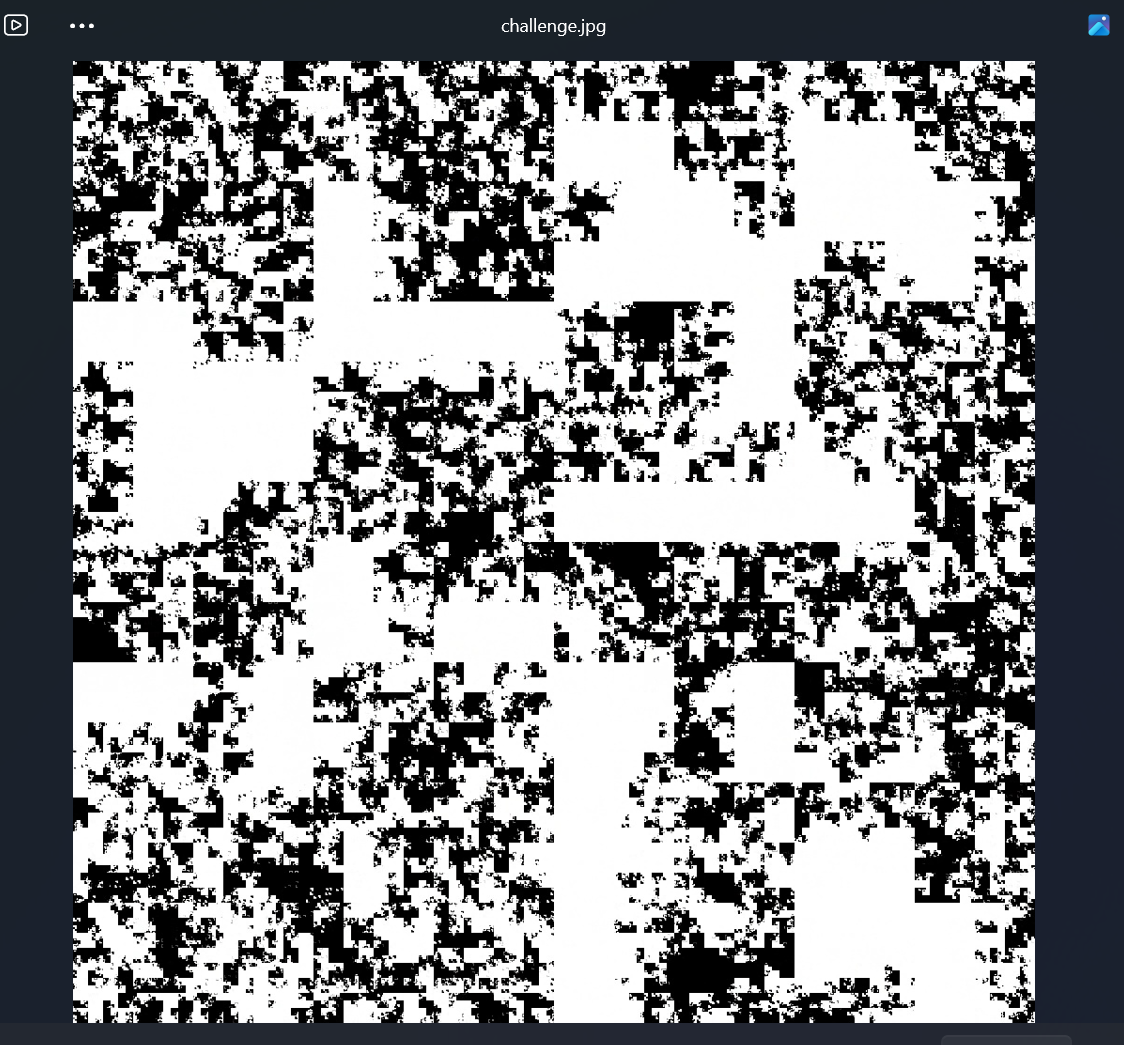
我的第一直觉是这是个二维码被加密了。然后114514是这张图的关键
结合题目"Curve with two"和附件里1024*1024,基本判断这是希尔伯特曲线
希尔伯特曲线概要
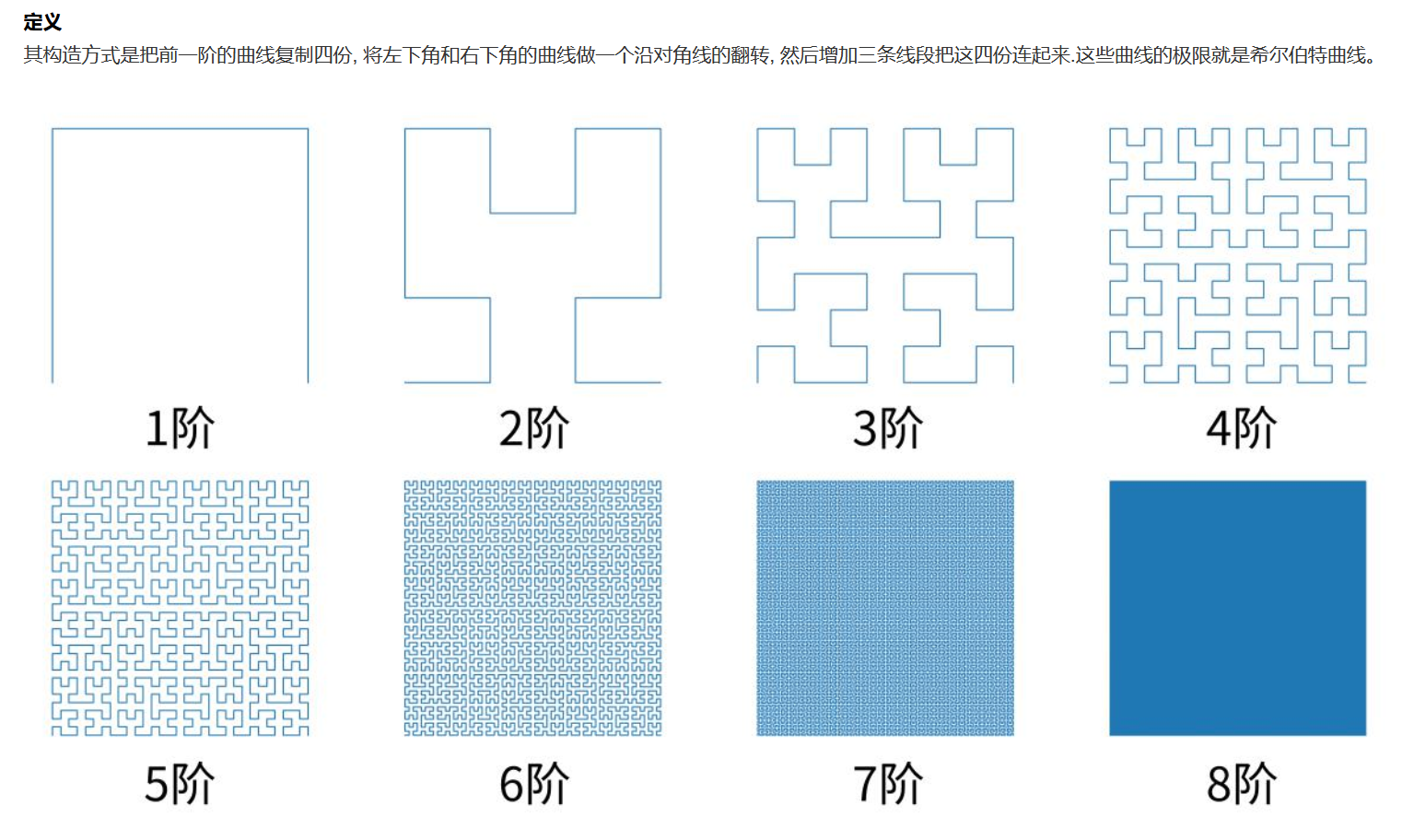
知识点:


他的主要生成原理
已经生成了上一阶 希尔伯特曲线 后生成下一阶,需要:

    把之前每个子正方形继续四等分,每4个小的正方形先生成上一阶阶希尔伯特曲线;
    每个小的四等分中第三第四象限的曲线分别沿两个对角线翻转;(生成核心)
    添加三条线段把 4 个上一阶的希尔伯特曲线首尾相连。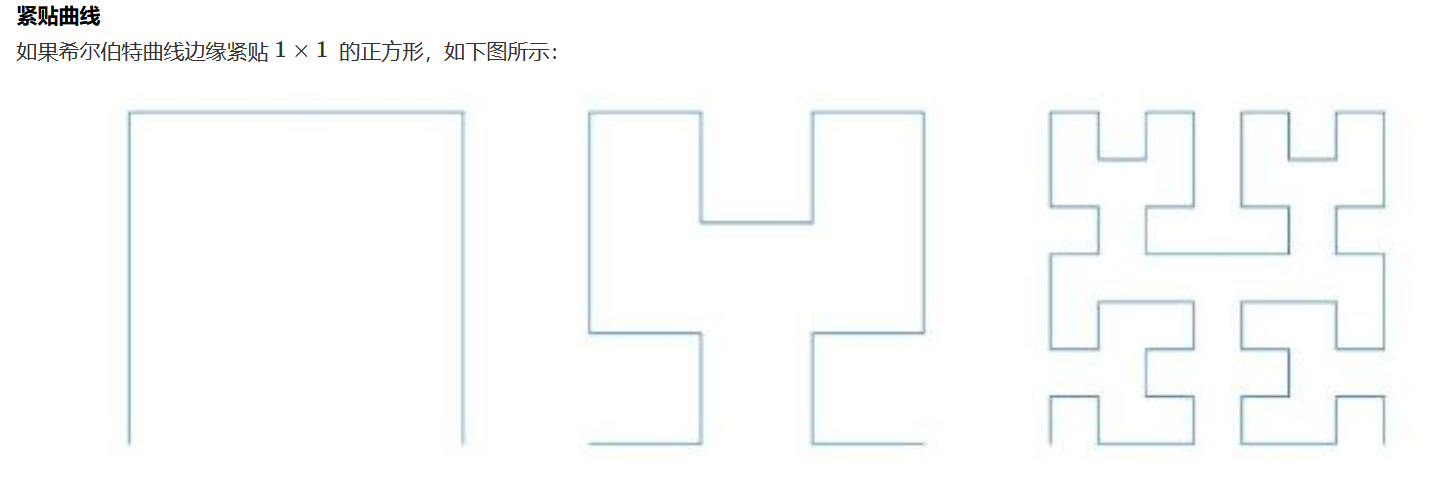
用AI生成的绘制代码;
import turtle

def hilbert_curve(turtle, level, angle, step):
    if level == 0:
        return
    turtle.right(angle)
    hilbert_curve(turtle, level - 1, -angle, step)
    turtle.forward(step)
    turtle.left(angle)
    hilbert_curve(turtle, level - 1, angle, step)
    turtle.forward(step)
    hilbert_curve(turtle, level - 1, angle, step)
    turtle.left(angle)
    turtle.forward(step)
    hilbert_curve(turtle, level - 1, -angle, step)
    turtle.right(angle)

turtle.setup(400, 400)
turtle.penup()
turtle.goto(-140, 140)
turtle.pendown()
hilbert_curve(turtle, 3, 90, 40)
turtle.done()
绘图过程的GIF:
https://developer.qcloudimg.com/http-save/yehe-8585088/fcd048bf2cda718475f85ec794a4338e.gif
针对这道题,代码如下:
import math
from pathlib import Path

import numpy as np
from hilbertcurve.hilbertcurve import HilbertCurve
from PIL import Image
from skimage.filters import threshold_otsu

# ============ 配置区域 ============
SCRIPT_DIR = Path(__file__).resolve().parent
IMAGE_PATH = SCRIPT_DIR / "challenge.jpg"
OFFSET = 114514
OUTPUT_IMAGE = SCRIPT_DIR / "decrypted.png"
OUTPUT_BIN = SCRIPT_DIR / "flag.bin"
# ==================================


def hilbert_raster_indices(w: int) -> np.ndarray:
    """生成希尔伯特曲线映射:距离 i -> 栅格索引 (y*w+x)"""
    n = int(math.log2(w))
    hc = HilbertCurve(n, 2)
    total = w * w

    # 向量化生成坐标,避免 Python 循环
    distances = np.arange(total)
    coords = np.array([hc.point_from_distance(d) for d in distances])
    x, y = coords[:, 0], coords[:, 1]

    return y * w + x


def decrypt_hilbert_cipher(
    encrypted_flat: np.ndarray,
    hilbert_order: np.ndarray,
    offset: int
) -> np.ndarray:
    """
    希尔伯特曲线循环移位解密。

    加密流程:plain_hilbert -> roll(-offset) -> enc_hilbert -> scatter to raster
    解密流程:raster -> gather to enc_hilbert -> roll(+offset) -> plain_hilbert -> scatter to raster
    """
    n = hilbert_order.shape[0]
    k = offset % n

    # 步骤1: 栅格序 → 希尔伯特序 (gather)
    enc_hilbert = encrypted_flat[hilbert_order]

    # 步骤2: 循环移位恢复 (roll +offset)
    plain_hilbert = np.roll(enc_hilbert, k, axis=0)

    # 步骤3: 希尔伯特序 → 栅格序 (scatter)
    decrypted = np.empty_like(encrypted_flat)
    decrypted[hilbert_order] = plain_hilbert

    return decrypted


def pack_bits_to_bytes(bits: np.ndarray) -> bytes:
    """将比特数组打包为字节,要求 bits 长度为 8 的倍数"""
    # 确保是 1D 且长度为 8 的倍数
    bits = bits.reshape(-1)
    length = (len(bits) // 8) * 8
    bits = bits[:length]

    # 重塑为 (N, 8) 并计算字节值
    bit_groups = bits.reshape(-1, 8)
    # MSB 在前:b = b0<<7 | b1<<6 | ... | b7<<0
    shifts = np.array([7, 6, 5, 4, 3, 2, 1, 0], dtype=np.uint8)
    bytes_arr = np.packbits(bit_groups, axis=1, bitorder='big').flatten()

    return bytes_arr.tobytes()


def extract_flag_binary(
    gray: np.ndarray,
    hilbert_order: np.ndarray,
    offset: int,
    out_path: Path
) -> None:
    """从灰度图中提取二值化并解密后的 flag 数据"""
    # Otsu 自动阈值二值化
    thresh = threshold_otsu(gray)
    binary_flat = (gray > thresh).astype(np.uint8).ravel()

    # 应用相同的希尔伯特解密
    decrypted_bits = decrypt_hilbert_cipher(binary_flat, hilbert_order, offset)

    # 打包为字节并写入
    byte_data = pack_bits_to_bytes(decrypted_bits)
    out_path.write_bytes(byte_data)

    print(f"[+] Flag 数据已写入: {out_path} ({len(byte_data)} 字节)")


def validate_image(img: Image.Image) -> int:
    """验证图像尺寸要求,返回边长"""
    w, h = img.size
    print(f"[+] 图像尺寸: {w} x {h}")

    if w != h:
        raise ValueError(f"图像必须是正方形 (当前: {w}x{h})")

    # 检查是否为 2 的幂
    if w & (w - 1) != 0:  # 更快的 2 的幂判断
        raise ValueError(f"边长必须是 2 的幂 (当前: {w})")

    return w


def main() -> None:
    # 检查文件存在
    if not IMAGE_PATH.is_file():
        raise FileNotFoundError(f"找不到图像: {IMAGE_PATH}")

    # 加载图像
    with Image.open(IMAGE_PATH) as img:
        side_length = validate_image(img)

        # 预计算希尔伯特映射(可缓存优化)
        hilbert_order = hilbert_raster_indices(side_length)

        # ========== 解密彩色/灰度图像 ==========
        img_array = np.array(img)
        original_shape = img_array.shape
        original_dtype = img_array.dtype

        # 展平为 (N, C) 或 (N,)
        flat = img_array.reshape(-1, original_shape[-1]) if img_array.ndim == 3 else img_array.ravel()

        # 解密
        decrypted_flat = decrypt_hilbert_cipher(flat, hilbert_order, OFFSET)
        decrypted_img = decrypted_flat.reshape(original_shape).astype(original_dtype)

        # 保存
        Image.fromarray(decrypted_img).save(OUTPUT_IMAGE)
        print(f"[+] 解密图像已保存: {OUTPUT_IMAGE}")

        # ========== 提取 Flag 数据 ==========
        gray_array = np.array(img.convert("L"))
        extract_flag_binary(gray_array, hilbert_order, OFFSET, OUTPUT_BIN)


if __name__ == "__main__":
    main()
代码核心逻辑概述:
普通扫描 (Z序):  希尔伯特曲线 (H序):
 1  2  3  4        1  2 15 16
 5  6  7  8       4  3 14 13
 9 10 11 12        5  6 11 12
13 14 15 16        8  7 10  9


===================================================================
加密核心逻辑:

原图像素: [A][B][C][D][E][F][G][H]...  (按H序排列)
           ↓
循环左移3位 (offset=3)
           ↓
加密像素: [D][E][F][G][H]...[A][B][C]  (还是H序)
           ↓
按栅格位置写回图像 → 得到加密图

直观理解:把"蛇形排列"的像素串剪断、平移、再接上,然后按正常网格塞回去。

====================================================================
解密核心逻辑:

加密图 → 按H序读出 → [D][E][F][G][H]...[A][B][C]
                         ↓
              循环右移3位 (offset=3)
                         ↓
                      [A][B][C][D][E][F][G][H]...  恢复原H序
                         ↓
              按栅格写回 → 得到原图

这道题代码用了python自带的库先读取出每个像素点,再进行移位处理,最后按照希尔伯特序列拼接成正常图片
解出正确的二维码:

放随波逐流解码后:
Congratulations on finding the hidden clue; the clue is secret1sy0urh3rt ;use it to get the key and decipher the code.这也提示我们可能会有隐藏的文件,放进随波逐流里面发现果然存在隐藏文件,我们用foremost提出隐藏的文件:
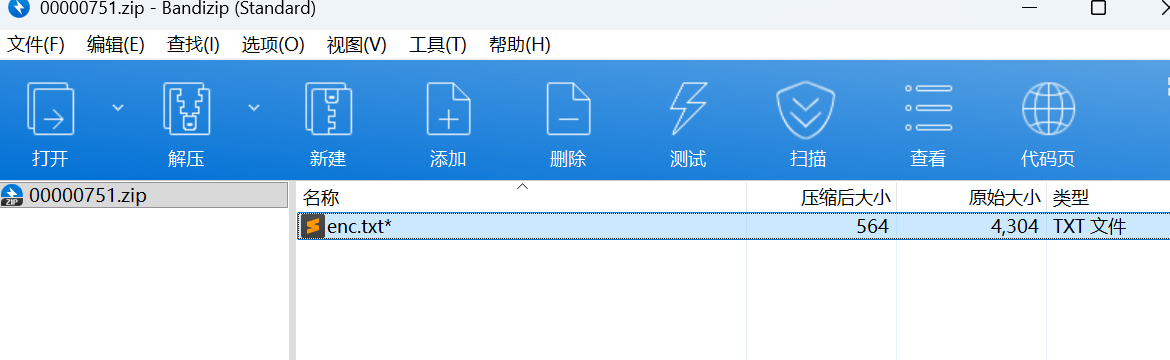
用得到的 ' secret1sy0urh3rt ' 发现并不是zip的密码,做到这的时候以为自己电脑卡了,哪个地方有问题,其实不然
这里直接暴力爆破
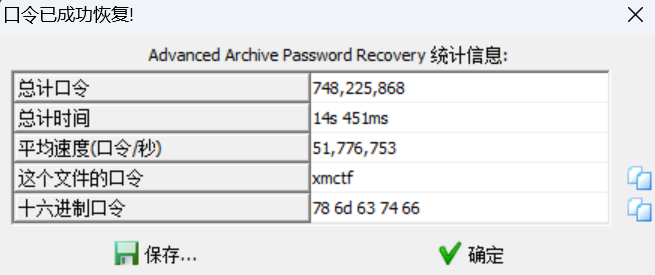
得到:
01100110011100100110111101101101001000000100001101110010011110010111000001110100011011110010111001000011011010010111000001101000011001010111001000100000011010010110110101110000011011110111001001110100001000000100000101000101010100110000110100001010011001100111001001101111011011010010000001000011011100100111100101110000011101000110111100101110010101010111010001101001011011000010111001010000011000010110010001100100011010010110111001100111001000000110100101101101011100000110111101110010011101000010000001110101011011100111000001100001011001000000110100001010011010010110110101110000011011110111001001110100001000000110100001100001011100110110100001101100011010010110001000001101000010100110100101101101011100000110111101110010011101000010000001100010011010010110111001100001011100110110001101101001011010010000110100001010000011010000101001100011011010010111000001101000011001010111001001110100011001010111100001110100010111110110100001100101011110000010000000111101001000000010001001100001011000010011000100110110011000110011001101100011011001010011011101100100011000110011000100110110011001010011100101100100001101110011011000110110001100010011010101100010001101010110010101100110001100100011010100111000001110000011001001100101011001100110000101100011001100100011001001100011001110000110001000111001001100000011001101100110001100100110000101100110011001010011100001100110011001010110001001100011011000010011000100110111001101100011011100110010001110000110010001100110001110000011100100111001001110010011000000110010001110010110001001100011001110000011010000110001001110000011010001100110001101010011011000111001001100100011000000110010011000010110010100110101011001100011100100110010011000010011100100111001011001010110011000110010011000010110010100100010000011010000101001101011011001010111100100100000001111010010000000100010011110000111100001111000011110000111100001111000011110000111100001111000011110000111100001111000011110000111100001111000011110000010001000001101000010100000110100001010011010110110010101111001001000000011110100100000011010000110000101110011011010000110110001101001011000100010111001101101011001000011010100101000011010110110010101111001001011100110010101101110011000110110111101100100011001010010100000101001001010010010111001100100011010010110011101100101011100110111010000101000001010010000110100001010011010010111011000100000001111010010000001100010001001110101110001111000001100000011000000100111001000000010101000100000001100010011011000001101000010100000110100001010011000110110100101110000011010000110010101110010011101000110010101111000011101000010000000111101001000000110001001101001011011100110000101110011011000110110100101101001001011100111010101101110011010000110010101111000011011000110100101100110011110010010100001100011011010010111000001101000011001010111001001110100011001010111100001110100010111110110100001100101011110000010100100001101000010100000110100001010011000110110100101110000011010000110010101110010001000000011110100100000010000010100010101010011001011100110111001100101011101110010100001101011011001010111100100101100001000000100000101000101010100110010111001001101010011110100010001000101010111110100001101000010010000110010110000100000011010010111011000101001000011010000101001100100011001010110001101110010011110010111000001110100011001010110010000100000001111010010000001110101011011100111000001100001011001000010100001100011011010010111000001101000011001010111001000101110011001000110010101100011011100100111100101110000011101000010100001100011011010010111000001101000011001010111001001110100011001010111100001110100001010010010110000100000010000010100010101010011001011100110001001101100011011110110001101101011010111110111001101101001011110100110010100101001000011010000101000001101000010100111000001101100011000010110100101101110011101000110010101111000011101000010000000111101001000000110010001100101011000110111001001111001011100000111010001100101011001000010111001100100011001010110001101101111011001000110010100101000001001110111010101110100011001100010110100111000001001110010100100001101000010100111000001110010011010010110111001110100001010000110011000100010011100100110010101110011011101010110110001110100001110100010000001111011011100000110110001100001011010010110111001110100011001010111100001110100011111010010001000101001直接丢在厨子里
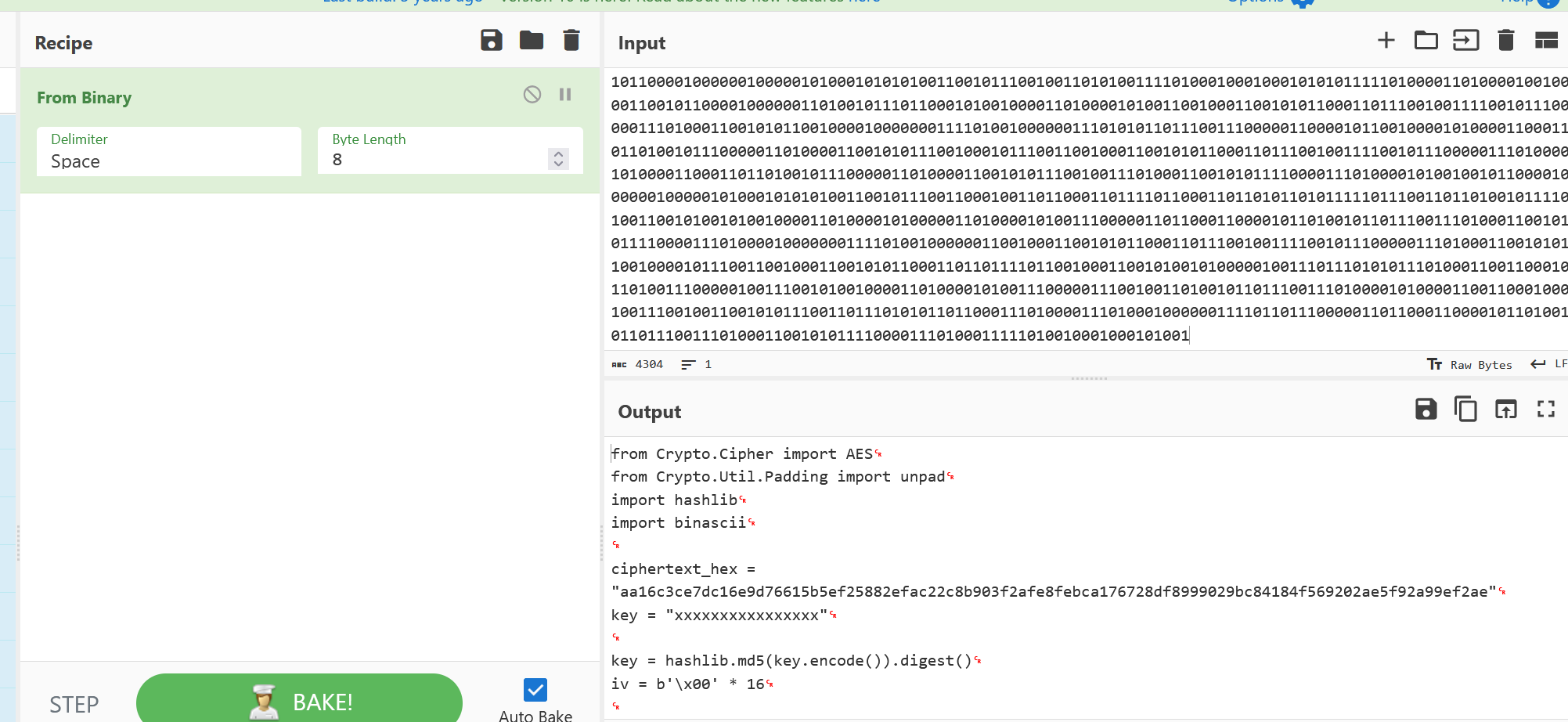
提出这段代码,在key处输入之前的密钥,解密就欧克了
"""
import binascii
import hashlib

from Crypto.Cipher import AES
from Crypto.Util.Padding import unpad

# 线索 QR:secret1sy0urh3rt → 作为 MD5 输入(16 字符)
KEY_PASSWORD = "secret1sy0urh3rt"
# 题目 enc.txt / 二进制解码中的密文
CIPHERTEXT_HEX = (
    "aa16c3ce7dc16e9d76615b5ef25882efac22c8b903f2afe8febca176728df899"
    "9029bc84184f569202ae5f92a99ef2ae"
)


defdecrypt_hex(ciphertext_hex: str, password: str = KEY_PASSWORD) -> bytes:
    key = hashlib.md5(password.encode()).digest()
    iv = bytes(16)
    ciphertext = binascii.unhexlify(ciphertext_hex.replace(" ", "").strip())
    cipher = AES.new(key, AES.MODE_CBC, iv)
    plaintext = cipher.decrypt(ciphertext)
    return unpad(plaintext, AES.block_size)


defmain() -> None:
    flag = decrypt_hex(CIPHERTEXT_HEX)
    print(flag.decode())


if __name__ == "__main__":
    main()
最终解码出最后的flag:
xmctf{e47b4bca-edaf-4e81-9f35-4dd419e7b133}关于这道题的碎碎念:
我感觉这是polarctf招新赛misc里为数不多的传统题之一了,涉及到图像隐写和密码学一些知识,这个比赛,我花了大把时间在这个题,每次都感觉临门一脚(比如找到密钥,但却不是打开zip的密钥),幸好最后解出来了。出题老师好厉害,挺喜欢这种题型的,在位置里面探索新东西,学习并运用新东西最终解出最后的flag,这就是MISC的魅力吧~
Comments NOTHING