初赛
为什么这玩意要设立在五一假期期间???你是觉得我假期都会用来等你出题然后认真解题吗。还学校卡半进复赛,还要给钱。这wp和flag也满天飞,刷新了我对白名单比赛的认知
misc1
题目信息
- 题目名:双校区来信
- 分值:100
- 类型:隐写 / 音频+图片取证
题面提示:
- “别只看图,广播更重要”
- “找到顺序,口令自然会出现”
附件:
shnu.jpgcampus_broadcast.wav
可以推断:
- 图片里可能藏有额外数据(常见为尾部拼接压缩包)。
- 广播音频里会给出压缩包密码或拼接顺序。
解题过程
1. 从图片中提取隐藏压缩包
检查 shnu.jpg 后发现其 JPEG 结束标记 FF D9 后仍有额外数据,并且存在 Rar!\x1A\x07 头。因此可从 JPEG 尾部截出一个隐藏的 RAR 文件。
2. 由广播得到密码与顺序
音频隐写,这里用ffmpeg:
ffmpeg -i input.wav -filter_complex "showspectrumpic=s=2400x800:mode=combined:scale=log" spec.png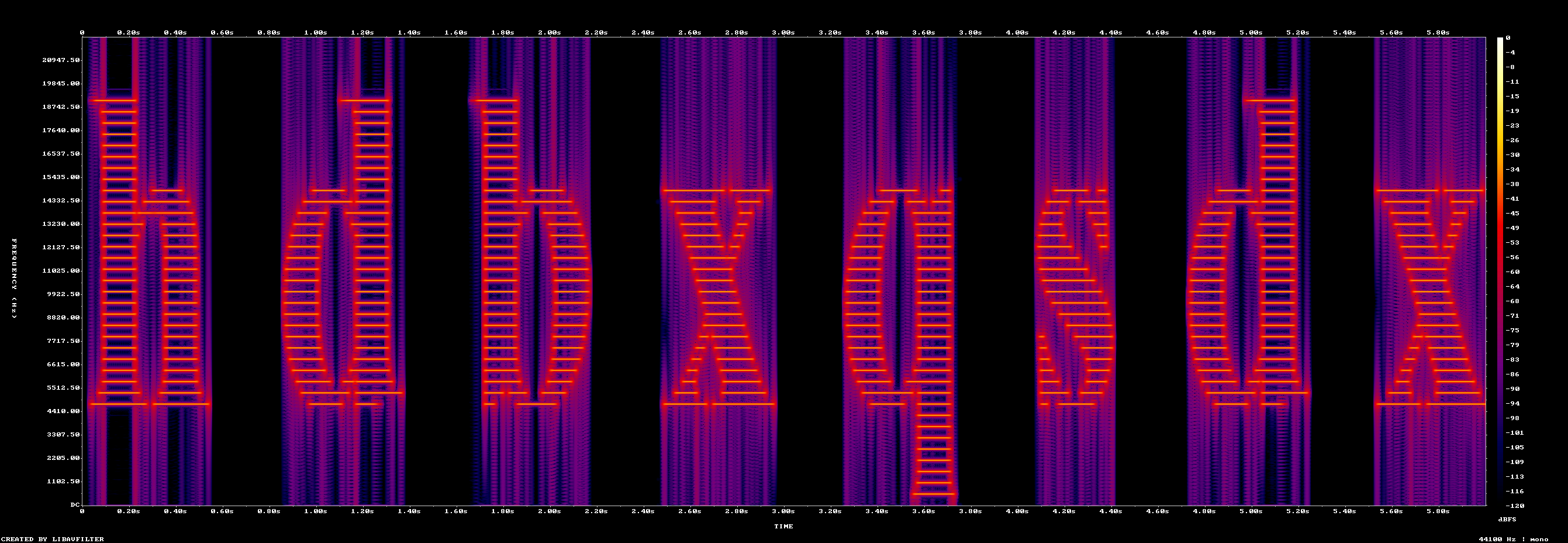
根据音频频谱/语音提示可得到拼音序列:hou de bo xue qiu shi du xing
进一步取各词首字母得到密码:hdbxqsdx
同时这串词本身就是碎片文件的拼接顺序:[hou, de, bo, xue, qiu, shi, du, xing](他们学校校训)
3. 解压并拼接碎片
使用密码解开隐藏 RAR,得到目录 campus_fragments/ 下多个文本碎片。按上面的顺序读取并拼接内容,最终包上 ISCC{} 即得到 flag。
关键脚本思路
- 在
shnu.jpg中定位 JPEG 结束位置。 - 从结束位置后查找 RAR 文件头并写出
hidden.rar。 - 使用
7z+ 密码hdbxqsdx解压。 - 依序读取
hou,de,bo,xue,qiu,shi,du,xing文件内容拼接。 - 输出
ISCC{...}。
最终 Flag
ISCC{wE3rT5yU7iO9pL0kJ2hG4fD6sA8qQ}misc2
镜厅中的回响 (Echoes in the Mirror Hall)
这天你的同伴在探索失落的丝莫王国时误入了一个神秘的镜厅,里面萦绕着一段重复播放的音乐,并有图像映射在周边的镜子中。你的同伴将镜厅中的所见所听录制成一段影像发给了你。现在,请解开镜厅的秘密,拯救你的同伴吧!
题目给出一个 40 秒的 CGI 视频 task.mp4——摄像机在一条布满菱形镜面的走廊里匀速前进,BGM 循环播放。“回响”(echo) 和 “重复播放的音乐” 是关键线索,提示信息藏在 音频 而不是 图像 里。
解题流程概览
attachment-4.zip  ──①──►  task.mp4   ──②──►  audio.wav
                                                 │
                                                 ③ 倒谱分析
                                                 ▼
                                           识别双回声 d0=100 / d1=130
                                                 │
                                                 ④ Echo Hiding 解码
                                                 ▼
                                              100 字节比特流
                                                 │
                                                 ⑤ 按 Morse 切分
                                                 ▼
                                      xxxxxxxxxxxx
                                                 │
                                                 ⑥ 套 flag
                                                 ▼
                                   ISCC{xxxxxxxxxxx}
Step 1 — ZIP 伪加密绕过
直接 unzip / 7z 都提示需要密码。对比局部文件头与中央目录的 GPB (General Purpose Bit) flag:
局部文件头 @ 0x00     : 00 00  ← 未加密
中央目录头 @ 0x1001e4a: 01 00  ← 声称加密
这是典型的 伪加密:把中央目录里那一位强制清零即可。
with open('attachment-4.zip', 'rb') as f:
    data = bytearray(f.read())
data[0x1001e4a:0x1001e4a+2] = b'\x00\x00'
with open('fixed.zip', 'wb') as f:
    f.write(data)

$ unzip fixed.zip
Archive:  fixed.zip
  inflating: task.mp4
得到 task.mp4(16,801,733 bytes,1280×720,H.264 + AAC,40s)。
Step 2 — 红鲱鱼:视频里的迷宫
首先对视频本身做了大量分析,这些最终都证明是 red herring,但值得记录以免后来者重走:
| 怀疑点 | 验证方法 | 结论 |
|---|---|---|
| 地板/墙面/天花板藏字 | 透视矫正 + Canny + 轮廓分析 (24 帧跨度) | 只是对称镜面建模 |
| 帧间 LSB 隐写 | frame_lsb.py 统计比特翻转率 | ≈ 48%,纯压缩噪声 |
| Mirror 面板对称差 | 左右镜像 mirror_diff | 仅 H.264 量化误差 |
| 消失点坐标变化 | vanishing_point_f*.png | 摄像机匀速前进,无调制 |
| SEI NAL 附加数据 | 手工解 AVCC | 有异常,见下文 |
2.1 MP4 里的巨型 SEI
在 mdat 里面手动遍历 AVCC NAL:
offset 0x28          mdat box, size=16,776,650
...
offset 0xb75cc8      NAL type=6 (SEI), size=2,757,867 bytes  ←← 反常!
一个 40 秒的 H.264 视频里出现 2.7 MB 的 SEI,非常可疑。解 RBSP (去掉 0x03 防竞争字节) 后发现:
- 前 17,380 字节是 127 条合法 SEI 子消息
- SEI stop bit
0x80之后 拼接了 2,740,201 bytes 的任意数据
这堆尾部数据试了 AES-ECB/CBC (各种 key:Morse 明文、SHA256、echo bytes)、RC4、XOR,全部失败——没有任何 magic bytes。推测只是 出题人塞进去的诱饵 / 容量填充,不是真正的 flag 载体。
教训:别让”看起来异常”就变成”一定有料”。尾部熵接近 8.0 + 没有可解结构 = 要么是二次加密、要么是填充。本题属于后者。
Step 3 — 音频提取与整体分析
ffmpeg -i task.mp4 -vn -acodec pcm_s16le audio.wav得到 PCM 16-bit 立体声,44100 Hz,1,764,352 samples (40.01 s)。
import scipy.io.wavfile as wav
import numpy as np
sr, x = wav.read('audio.wav')        # (1764352, 2)
L, R = x[:, 0].astype(np.float32), x[:, 1].astype(np.float32)
print(np.corrcoef(L, R)[0, 1])       # 0.9999... ⇒ 双声道几乎完全相同
频谱 (spec_*.png) 看上去是普通的环境乐,没有 SSTV tone、没有 FSK、没有 DTMF。于是把注意力转到 回声 本身。
Step 4 — 倒谱分析发现回声延迟
Echo Hiding (Bender 1996) 最直接的破法是 倒谱 (cepstrum):
$$c[n] = \mathrm{IFFT}\bigl(\log \lvert \mathrm{FFT}(x[n]) \rvert^2\bigr)$$
回声 x[n] + α·x[n-d] 会在倒谱的 n = d 处形成尖峰。
import numpy as np, scipy.io.wavfile as wav
sr, x = wav.read('audio.wav')
sig = x[:, 0].astype(np.float32)

spec = np.fft.rfft(sig[:1 << 20])
cep  = np.fft.irfft(np.log(np.abs(spec) ** 2 + 1e-10))
top = np.argsort(cep[1:500])[-10:][::-1]
print(top + 1)
# → [100 130 200 260 ...]两条明显的独立延迟:
d0 = 100samples (≈ 2.27 ms)d1 = 130samples (≈ 2.95 ms)
这是经典的 双延迟 Echo Hiding:bit 0 → 延迟 d0,bit 1 → 延迟 d1,通过比较两个延迟在倒谱上的能量判决即可。
Step 5 — Echo Hiding 比特解码
import numpy as np, scipy.io.wavfile as wav

def decode_echo(sig, window, d0=100, d1=130):
    bits = []
    for off in range(0, len(sig) - window + 1, window):
        seg = sig[off:off + window]
        spec = np.fft.rfft(seg)
        logp = np.log(np.abs(spec) ** 2 + 1e-10)
        cep  = np.fft.irfft(logp)
        p0 = max(cep[max(1, d0 - 2):d0 + 3])
        p1 = max(cep[max(1, d1 - 2):d1 + 3])
        bits.append(0 if p0 > p1 else 1)
    return bits

sr, x = wav.read('audio.wav')
bits = decode_echo(x[:, 0].astype(np.float32), window=2205)  # 50 ms/bit
print(len(bits))                # 800 bits
窗宽 ws = 2205 samples = 50 ms 是通过扫描 1000~8000 试出来的——在这个值上前 74 字节是可打印 ASCII,且每个 bit 的置信度 (|peak1 − peak0|) 最高。
nbytes = len(bits) // 8
by = bytes(int(''.join(map(str, bits[i*8:(i+1)*8])), 2) for i in range(nbytes))
print(by[:80])
输出:
b'..--- ..--.. ..- .--- -..-. -.-- -.--. ..--- ... .-.-. ...-- .-.. - .-- -.\x00...'前 74 字节是 空格 + 点划的 Morse 码,第 75 字节之后突然是 \x00 / 乱码——这和 echo_conf.py 输出的置信度吻合:
| byte idx | min conf | 状态 |
|---|---|---|
| 0 – 73 | ≥ 0.527 | 清晰 |
| 74 | 0.084 | 消息边界 |
Step 6 — Morse 解码
拿到 74 字节的 Morse 文本:
..--- ..--.. ..- .--- -..-. -.-- -.--. ..--- ... .-.-. ...-- .-.. - .-- -.用 ITU-R M.1677 标准表(含数字、标点) 对每个 group 查表:
| Morse | 字符 |
|---|---|
..--- | 2 |
..--.. | ? |
..- | U |
.--- | J |
-..-. | / |
-.-- | Y |
-.--. | ( |
..--- | 2 |
... | S |
.-.-. | + |
...-- | 3 |
.-.. | L |
- | T |
.-- | W |
-. | N |
MORSE = {
    '.-':'A','-...':'B','-.-.':'C','-..':'D','.':'E','..-.':'F','--.':'G',
    '....':'H','..':'I','.---':'J','-.-':'K','.-..':'L','--':'M','-.':'N',
    '---':'O','.--.':'P','--.-':'Q','.-.':'R','...':'S','-':'T','..-':'U',
    '...-':'V','.--':'W','-..-':'X','-.--':'Y','--..':'Z',
    '-----':'0','.----':'1','..---':'2','...--':'3','....-':'4','.....':'5',
    '-....':'6','--...':'7','---..':'8','----.':'9',
    '.-.-.-':'.','--..--':',','..--..':'?','-.-.--':'!',
    '-....-':'-','-..-.':'/','-.--.':'(','-.--.-':')',
    '.----.':"'",'---...':':','-.-.-.':';','.-.-.':'+','-...-':'=',
    '.-..-.':'"','...-..-':'$','.--.-.':'@',
}
msg = '..--- ..--.. ..- .--- -..-. -.-- -.--. ..--- ... .-.-. ...-- .-.. - .-- -.'
print(''.join(MORSE[g] for g in msg.split()))
Step 7 — 构造 Flag
ISCC 的标准格式 ISCC{...},把解出的明文套上即可:
> 注意:明文里出现的 `?` `/` `(` `+` 这些"非正常 flag 字符"不是解错了,而是题目故意用 Morse **标点表** 里的字符——正好配合 `..--..`、`-..-.`、`-.--.`、`.-.-.` 这几个长度 5~6 的 Morse group,让 74 字节的 payload 对齐到 bit 边界。

---

## 附:一体化脚本

```python
"""misc22 one-shot solver."""
import numpy as np, scipy.io.wavfile as wav, subprocess, pathlib

# 1. ZIP 伪加密修复
z = pathlib.Path('attachment-4.zip').read_bytes()
pathlib.Path('fixed.zip').write_bytes(z[:0x1001e4a] + b'\x00\x00' + z[0x1001e4a+2:])
subprocess.run(['unzip', '-o', 'fixed.zip'], check=True)

# 2. 抽音轨
subprocess.run(['ffmpeg', '-y', '-i', 'task.mp4', '-vn',
                '-acodec', 'pcm_s16le', 'audio.wav'], check=True)

# 3. Echo 解码
sr, x = wav.read('audio.wav')
sig = x[:, 0].astype(np.float32)
d0, d1, ws = 100, 130, 2205
bits = []
for off in range(0, len(sig) - ws + 1, ws):
    seg = sig[off:off+ws]
    cep = np.fft.irfft(np.log(np.abs(np.fft.rfft(seg))**2 + 1e-10))
    p0 = max(cep[d0-2:d0+3]); p1 = max(cep[d1-2:d1+3])
    bits.append(0 if p0 > p1 else 1)

by = bytes(int(''.join(map(str, bits[i*8:(i+1)*8])), 2)
           for i in range(len(bits)//8))
morse_text = by[:74].decode()

MORSE = {  # 省略,同正文
    '.-':'A','-...':'B', ...
}
plain = ''.join(MORSE[g] for g in morse_text.split())
print(f'ISCC{{{plain}}}')
总结 / 踩坑
- 题面关键词:
"回响"+"重复播放的音乐"≈ Echo Hiding,中文题目在暗示而非装饰。 - 倒谱是 echo hiding 的标配破法:一次 FFT + log + IFFT 就能定位双延迟,不需要机器学习,也不需要已知明文。
- 红鲱鱼拉满:2.7 MB 的 SEI 附加数据、看似”藏字”的地板、镜面对称,都是 40-50% 耗时的陷阱。坚信密钥信息密度 ——真正的 payload 只有 74 字节。
- 窗宽要扫:
ws决定比特率,没提示时从 1024 起步 2× 翻倍扫,找到 “前 N 字节全可打印 ASCII” 的那一档。 - Morse 要带标点:
.-.-.=+、..--..=?这些不在纯字母表里,需要用 ITU-R M.1677 完整表。
misc3
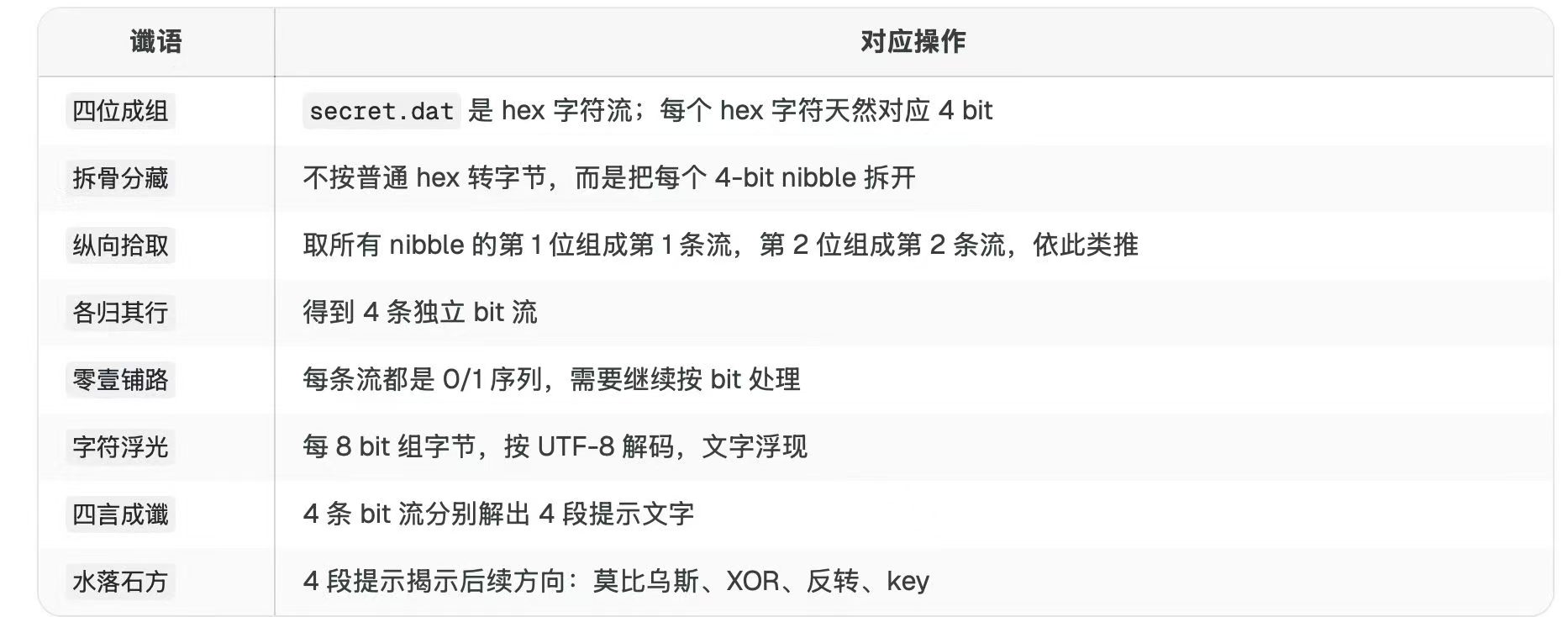
这个题一直0解,最后给了提示做出来1个,接着如病毒扩散一样全都做出来了,一个文字游戏题。有点恶心,找不到附件了,故而没有复现,大致流程如下
复赛
学校进5个给经费支持,本人由于五一在耍最后几个小时看wp只交了几个,有幸第六名,因此在这个交了198的比赛里面有幸陪跑。第一天上午以来就服务器卡爆是真的没话讲,一开始所有wp都出来了,就看谁先刷新出题,这个比赛含金量还在不断上升
misc1
步骤一:流量概览
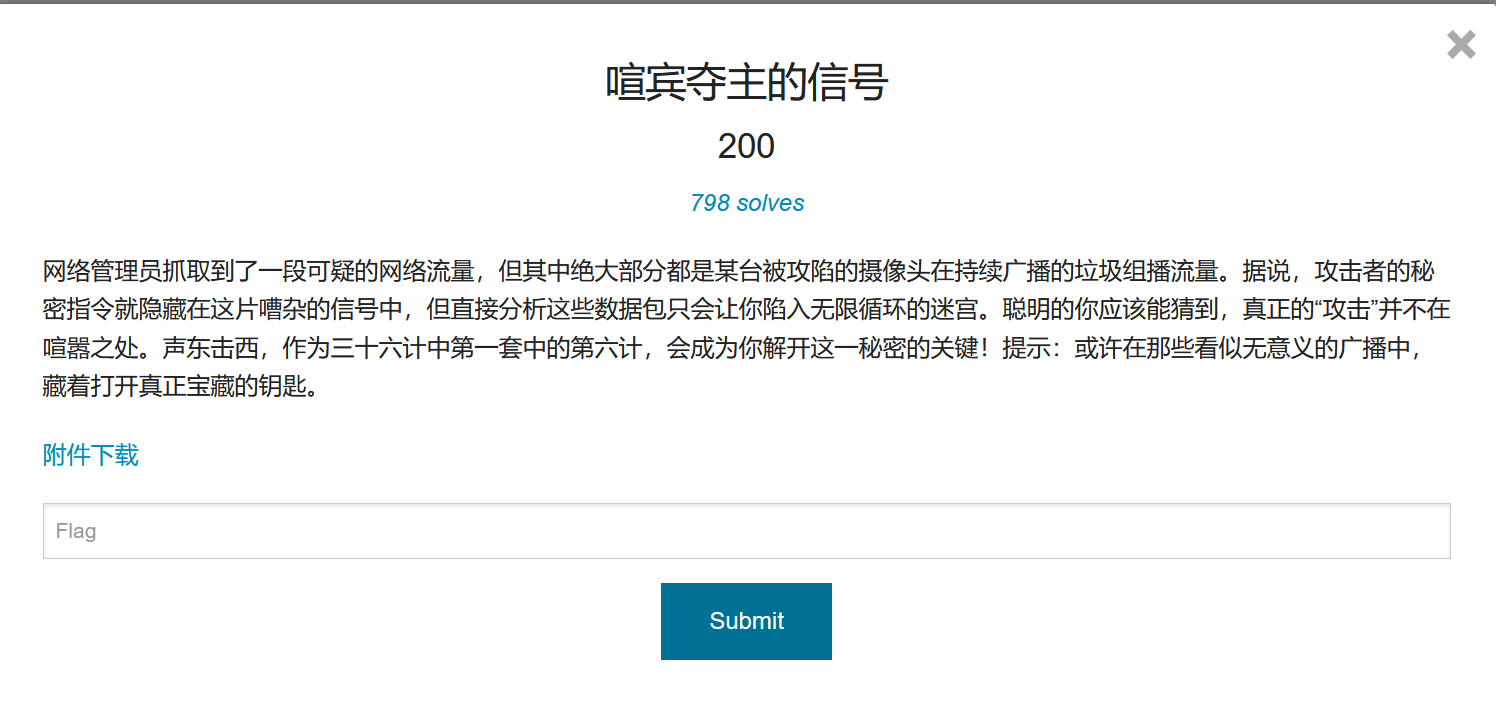
用 scapy 分析 pcapng 文件,共 1509 个数据包:
| 来源 IP | 目标 IP | 协议 | 数量 |
|---|---|---|---|
| 192.168.1.100 | 239.255.255.250 | UDP | 1500 |
| 192.168.1.100 | 45.78.1.1 | TCP | 9 |
- 1500 个 UDP 组播包 → “声东”(佯攻/喧嚣)
- 9 个 TCP 包 → “击西”(真正的攻击)
步骤二:组播流量中的钥匙
UDP 组播包的目标端口为 1900(SSDP),每个包携带 28 字节 Base64 载荷。1497 个唯一载荷中,有一个出现了 4 次:
U2hlbmdEb25nSmlYaUAzNi0xLTY=Base64 解码得到:
ShengDongJiXi@36-1-6即”声东击西@36-1-6″(三十六计第一套第六计)。这既是提示,也是后续解密的密码。
步骤三:TCP 流量中的真正指令
9 个 TCP 包是 192.168.1.100:12345 ↔ 45.78.1.1:80 的 HTTP 通信。其中第 4 个包(PSH+ACK)携带 HTTP POST 请求:
POST /command HTTP/1.1
Host: 45.78.1.1
Content-Type: application/json
Content-Length: 680

{"instruction": "<Base64>", "note": "This is the real command."}
instruction 字段是一长串 Base64,解码后以 PK\x03\x04 开头——这是一个 ZIP 文件。
步骤四:解密 ZIP
ZIP 使用 AES-128 加密(compression method 99),密码正是组播流量中提取的:
ShengDongJiXi@36-1-6解压得到一张 100×100 像素的 RGB PNG 图片 image.png。
步骤五:LSB 隐写提取 Flag
PNG 图片看似纯色(灰蓝色),但像素值在微小范围内波动:
- R ∈ {72, 73}
- G ∈ {108, 109}
- B ∈ {136, 137}
每个通道只有两个可能值,差值恰好为 1。这是典型的 LSB(最低有效位)隐写:每个像素的每个颜色通道的 LSB 编码 1 bit 信息。
提取方法:遍历所有像素,按 RGB 交错顺序读取每个通道的 LSB,每 8 位转换为一个 ASCII 字符。
from PIL import Image

img = Image.open("image.png")
px = img.load()

bits = ''
for y in range(100):
    for x in range(100):
        r, g, b = px[x, y]
        bits += str(r & 1) + str(g & 1) + str(b & 1)

flag = ''
for i in range(0, len(bits) - 7, 8):
flag += chr(int(bits[i:i+8], 2))ISCC{1d3f1c44t10n_1s4_th3_k3y_t0_v1cmtc0Fry}总结
| 阶段 | 技术 | 说明 |
|---|---|---|
| 流量分析 | Scapy | 分离组播噪声与 TCP 真实通信 |
| 密钥发现 | Base64 解码 | 组播载荷中重复出现的密码 |
| 数据提取 | ZIP AES-128 | 从 TCP 载荷 Base64 中还原加密 ZIP |
| 隐写解码 | LSB 隐写 | 从 PNG 像素最低位提取 Flag |
三十六计”声东击西”贯穿全题:组播流量是”声东”(佯攻),TCP HTTP 请求是”击西”(实攻);组播中的 Base64 字符串是打开 ZIP 的钥匙,而 ZIP 内的 PNG 又通过 LSB 隐写藏匿了最终的 Flag。
misc2
给了一个加密压缩包和21个有编号的png,每个PNG是条形码,可以读取所有的值。另外LSB存在红色通道隐写,每个图片还有Comment,提取这些数据
from PIL import Image
import os
import struct

base = r'C:\Users\q1388\Downloads\attachment-18'

def extract_lsb_red_clean(img_path):
    """Extract LSB of red channel, try all 8 bit offsets to find clean readable data."""
    img = Image.open(img_path).convert('RGB')
    pixels = list(img.getdata())

    # Extract red channel LSB bits
    bits = []
    for p in pixels:
        bits.append(p[0] & 1)

    best_results = []
    for offset in range(8):
        byte_chars = []
        for i in range(offset, len(bits) - 7, 8):
            byte = 0
            for j in range(8):
                byte = (byte << 1) | bits[i + j]
            byte_chars.append(byte)
        # Look for the longest printable segment
        segs = []
        current = []
        for b in byte_chars:
            if 32 <= b < 127:
                current.append(chr(b))
            else:
                if current:
                    segs.append(''.join(current))
                    current = []
        if current:
            segs.append(''.join(current))
        best_results.append((offset, segs))
    return best_results

def extract_lsb_raw_message(img_path):
    """Try to extract LSB as a contiguous hidden message using all red pixels."""
    img = Image.open(img_path).convert('RGB')
    pixels = list(img.getdata())

    # Red LSB bits in order
    bits = []
    for p in pixels:
        bits.append(p[0] & 1)

    # Try each bit offset 0-7 to get clean byte alignment
    results = {}
    for offset in range(8):
        raw_bytes = []
        for i in range(offset, len(bits) - 7, 8):
            byte = 0
            for j in range(8):
                byte = (byte << 1) | bits[i + j]
            raw_bytes.append(byte)
        results[offset] = bytes(raw_bytes)
    return results

# PNG comments
def get_comments(filepath):
    with open(filepath, 'rb') as f:
        f.read(8)  # sig
        comments = []
        while True:
            lb = f.read(4)
            if len(lb) < 4: break
            length = struct.unpack('>I', lb)[0]
            ctype = f.read(4)
            data = f.read(length) if length > 0 else b''
            f.read(4)  # crc
            if ctype == b'IEND': break
            if ctype == b'tEXt':
                null = data.find(b'\x00')
                if null >= 0:
                    kw = data[:null].decode('latin-1')
                    txt = data[null+1:].decode('latin-1')
                    comments.append((kw, txt))
        return comments

print("=" * 80)
print("COMPLETE EXTRACTION — BARCODE / LSB RED / COMMENT")
print("=" * 80)

all_lsb = []
all_comments = []
all_barcodes = []

for i in range(21):
    fname = f'barcode_{i:02d}.png'
    path = os.path.join(base, fname)
    print(f"\n{'─'*60}")
    print(f"[{i:02d}] {fname}")

    # Barcode
    from pyzbar.pyzbar import decode as zbar_decode
    decoded = zbar_decode(Image.open(path))
    barcode_data = decoded[0].data.decode('utf-8') if decoded else '(none)'
    all_barcodes.append(barcode_data)
    print(f"    Barcode : {barcode_data}")

    # Comment
    comments = get_comments(path)
    comment_str = comments[0][1] if comments else '(none)'
    all_comments.append(comment_str)
    print(f"    Comment : {comment_str}")

    # LSB red — find the best offset with longest readable segment
    raw_msgs = extract_lsb_raw_message(path)
    # Usually the "real" hidden message starts right at the first pixel
    # Try offset by reading first few bytes at each offset
    best = ""
    for off in range(8):
        data = raw_msgs[off]
        # Find longest printable segment
        printable = bytearray()
        for b in data:
            if 32 <= b < 127:
                printable.append(b)
            elif len(printable) > 3:
                break  # end of segment
            else:
                printable = bytearray()  # reset
        candidate = printable.decode('ascii', errors='replace')
        if len(candidate) > len(best):
            best = candidate

    # Also try the very first 8 chars from offset 0
    # The typical steganography puts the message starting at pixel 0
    first_bytes = raw_msgs[0]
    raw_printable = ''.join(chr(b) if 32 <= b < 127 else '.' for b in first_bytes[:50])

    all_lsb.append(best if best else raw_printable[:20])
    print(f"    LSB Red : {best if best else '(no clean segment found)'}")
    print(f"    LSB (raw first 50 bytes): {raw_printable}")

# Summary
print(f"\n{'='*80}")
print("SUMMARY TABLE")
print(f"{'='*80}")
print(f"{'#':>3}  {'Barcode':<12} {'LSB Red':<16} {'Comment':<12}")
print(f"{'─'*3}  {'─'*12} {'─'*16} {'─'*12}")
for i in range(21):
    print(f"{i:>3}  {all_barcodes[i]:<12} {all_lsb[i]:<16} {all_comments[i]:<12}")

# Look for patterns
print(f"\n{'='*80}")
print("CONCATENATED DATA (all LSB messages combined):")
print(f"{'='*80}")
print(''.join(all_lsb))

print(f"\nAll Comments concatenated:")


print(''.join(all_comments))

# Check if barcodes form a pattern when concatenated
print(f"\nAll Barcodes concatenated:")
print(''.join(all_barcodes))


  ┌─────┬──────────┬──────────┬──────────┐
  │  #  │ Barcode  │ LSB Red  │ Comment  │
  ├─────┼──────────┼──────────┼──────────┤
  │ 00  │ J03a03fJ │ ezI4WEt3 │ rnQZDgzm │
  ├─────┼──────────┼──────────┼──────────┤
  │ 01  │ zbnFJazb │ plDre1U2 │ A1fd57fA │
  ├─────┼──────────┼──────────┼──────────┤
  │ 02  │ P}1LZrPm │ H000100H │ MNSKk6qD │
  ├─────┼──────────┼──────────┼──────────┤
  │ 03  │ dWtNaXR9 │ M1bf54bM │ iPjJGRXX │
  ├─────┼──────────┼──────────┼──────────┤
  │ 04  │ zCUS3K8x │ T1057d1T │ M3F2QUV9 │
  ├─────┼──────────┼──────────┼──────────┤
  │ 05  │ P1041a7P │ LKE6JRrm │ RmxhZz0= │
  ├─────┼──────────┼──────────┼──────────┤
  │ 06  │ zybUNbYS │ hj8W6pWE │ N001ab1N │
  ├─────┼──────────┼──────────┼──────────┤
  │ 07  │ RGZuNVl9 │ lTD4YoV8 │ G1fd57fG │
  ├─────┼──────────┼──────────┼──────────┤
  │ 08  │ RmxhZz0= │ C17595dC │ F4tcgeVU │
  ├─────┼──────────┼──────────┼──────────┤
  │ 09  │ ezM3anlz │ R1758b2R │ xLTGj7W8 │
  ├─────┼──────────┼──────────┼──────────┤
  │ 10  │ SGw4NTB9 │ 0UCxLxzR │ F104e41F │
  ├─────┼──────────┼──────────┼──────────┤
  │ 11  │ RmxhZz0= │ CNxSHPv6 │ L1a0f20L │
  ├─────┼──────────┼──────────┼──────────┤
  │ 12  │ aW5ub3Rl │ iJVzvtdg │ B104641B │
  ├─────┼──────────┼──────────┼──────────┤
  │ 13  │ tNMZvoRm │ I1e5f9dI │ NNEaGhzh │
  ├─────┼──────────┼──────────┼──────────┤
  │ 14  │ RmxhZz0= │ S175bccS │ AIfO30BL │
  ├─────┼──────────┼──────────┼──────────┤
  │ 15  │ DQJv0Hrw │ e0dCWTlR │ K1470e5K │
  ├─────┼──────────┼──────────┼──────────┤
  │ 16  │ E17515dE │ ldd}S9UB │ m5qEHfnr │
  ├─────┼──────────┼──────────┼──────────┤
  │ 17  │ TmJCUDh9 │ 4bpuUs2l │ D175b5dD │
  ├─────┼──────────┼──────────┼──────────┤
  │ 18  │ Q1749e6Q │ pH}Uf7gn │ LPKxr9tg │
  ├─────┼──────────┼──────────┼──────────┤
  │ 19  │ zqptXF0J │ 3lvCqkRW │ O1fca70O │
  ├─────┼──────────┼──────────┼──────────┤
  │ 20  │ OBhdxqpx │ QdX4GOwN │ U1fd51cU │
  └─────┴──────────┴──────────┴──────────┘
三层信息中,有一层会匹配 AxxxxxxA 到 UxxxxxxU,分别提取
  ┌──────┬──────────┬─────────┬──────┐
  │ 字母  │    值    │ 所在列  │ 行号 │
  ├──────┼──────────┼─────────┼──────┤
  │ A    │ A1fd57fA │ Comment │ 01   │
  ├──────┼──────────┼─────────┼──────┤
  │ B    │ B104641B │ Comment │ 12   │
  ├──────┼──────────┼─────────┼──────┤
  │ C    │ C17595dC │ LSB Red │ 08   │
  ├──────┼──────────┼─────────┼──────┤
  │ D    │ D175b5dD │ Comment │ 17   │
  ├──────┼──────────┼─────────┼──────┤
  │ E    │ E17515dE │ Barcode │ 16   │
  ├──────┼──────────┼─────────┼──────┤
  │ F    │ F104e41F │ Comment │ 10   │
  ├──────┼──────────┼─────────┼──────┤
  │ G    │ G1fd57fG │ Comment │ 07   │
  ├──────┼──────────┼─────────┼──────┤
  │ H    │ H000100H │ LSB Red │ 02   │
  ├──────┼──────────┼─────────┼──────┤
  │ I    │ I1e5f9dI │ LSB Red │ 13   │
  ├──────┼──────────┼─────────┼──────┤
  │ J    │ J03a03fJ │ Barcode │ 00   │
  ├──────┼──────────┼─────────┼──────┤
  │ K    │ K1470e5K │ Comment │ 15   │
  ├──────┼──────────┼─────────┼──────┤
  │ L    │ L1a0f20L │ Comment │ 11   │
  ├──────┼──────────┼─────────┼──────┤
  │ M    │ M1bf54bM │ LSB Red │ 03   │
  ├──────┼──────────┼─────────┼──────┤
  │ N    │ N001ab1N │ Comment │ 06   │
  ├──────┼──────────┼─────────┼──────┤
  │ O    │ O1fca70O │ Comment │ 19   │
  ├──────┼──────────┼─────────┼──────┤
  │ P    │ P1041a7P │ Barcode │ 05   │
  ├──────┼──────────┼─────────┼──────┤
  │ Q    │ Q1749e6Q │ Barcode │ 18   │
  ├──────┼──────────┼─────────┼──────┤
  │ R    │ R1758b2R │ LSB Red │ 09   │
  ├──────┼──────────┼─────────┼──────┤
  │ S    │ S175bccS │ LSB Red │ 14   │
  ├──────┼──────────┼─────────┼──────┤
  │ T    │ T1057d1T │ LSB Red │ 04   │
  ├──────┼──────────┼─────────┼──────┤
  │ U    │ U1fd51cU │ Comment │ 20   │
  └──────┴──────────┴─────────┴──────┘
这里一共有 21 组数据,编号为 A 到 U ,刚好是 21 行。每组数据是 6 位十六进制,即 24 bit。而 QR Code version 1 的尺寸是 21 x 21 。因此可以将每组十六进制转成 24 位二进制,然后每行丢掉前 3 bit,保留后 21 bit,拼成一个 21 x 21 的二维码矩阵。
from PIL import Image
import zxingcpp
rows = {
      "A": "1fd57f", "B": "104641", "C": "17595d", "D": "175b5d",
      "E": "17515d", "F": "104e41", "G": "1fd57f", "H": "000100",
      "I": "1e5f9d", "J": "03a03f", "K": "1470e5", "L": "1a0f20",
      "M": "1bf54b", "N": "001ab1", "O": "1fca70", "P": "1041a7",
      "Q": "1749e6", "R": "1758b2", "S": "175bcc", "T": "1057d1",
      "U": "1fd51c",
  }
order = "ABCDEFGHIJKLMNOPQRSTU"
scale = 10
quiet = 4
qr = Image.new("RGB", ((21 + 2 * quiet) * scale, (21 + 2 * quiet) * scale),
"white")
for y, ch in enumerate(order):
    bits = f"{int(rows[ch], 16):024b}"[3:] # 保留后 21 bit
    for x, b in enumerate(bits):
        if b == "1":
            for yy in range((y + quiet) * scale, (y + quiet + 1) * scale):
                for xx in range((x + quiet) * scale, (x + quiet + 1) * scale):
                    qr.putpixel((xx, yy), (0, 0, 0))
qr.save("qr.png")
print(zxingcpp.read_barcodes(qr)[0].text)
得到二维码
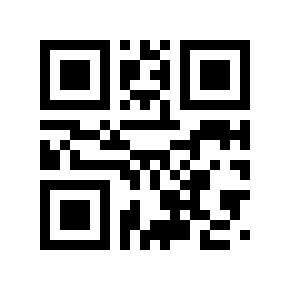
得到
M741rTwaoSZLCov这个密码可以打开压缩包,得到一个pdf
直接查看 PDF 表面内容只是一张乐谱,但用 PyMuPDF 提取文本可以发现隐藏文字:
import fitz
doc = fitz.open("score_extract/music score.pdf")
print(doc[0].get_text())
输出:
KEY+bnVtYmVyYWJvdmVsaW5l3


另外base64解码:
KEY + number above line 3
number above line 3 表示取第三行五线谱上方的数字。观察 PDF 第三行,谱线上方的数字依次为:
4 1 5 1 5 1 5所以flag是压缩包密码+4151515
ISCC{M741rTwaoSZLCov4151515}擂台赛-misc
题目描述
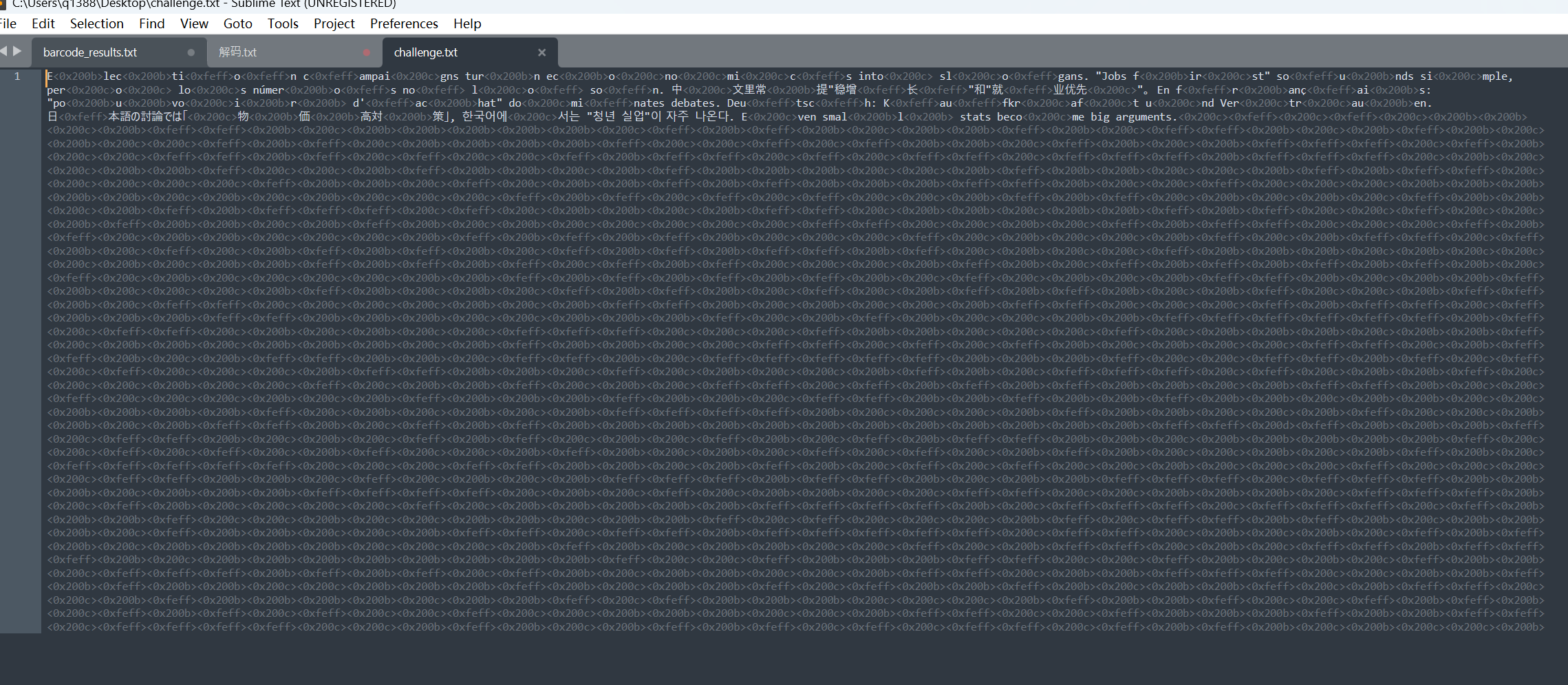
附件 showtime_01.zip 解压后得到 challenge.txt,表面是一段多语言文本,内部夹杂大量不可见字符。
1. 零宽字符提取与统计
读取文件,提取零宽字符:
from pathlib import Path
from collections import Counter
s = Path("challenge.txt").read_text(encoding="utf-8")
chars = ["", "", "", ""]
hidden = "".join(c for c in s if c in chars)
print(len(hidden)) # 2592
print(Counter(hidden)) # {'': 677, '': 653, '': 640, '': 622}共 2592 个零宽字符,4 种字符数量接近,初步判断每字符编码 2 bit。
2. 零宽字符 → 二进制解码
按 Unicode 码点顺序建立 2-bit 映射:
| 字符 | Unicode | 映射 |
|---|---|---|
| U+200B | ZWSP | 00 |
| U+200C | ZWNJ | 01 |
| U+200D | ZWJ | 10 |
| U+FEFF | BOM | 11 |
mapping = {
"": "00",
"": "01",
"": "10",
"": "11",
}
bits = "".join(mapping[c] for c in s if c in mapping)
data = bytes(
int(bits[i:i+8], 2)
for i in range(0, len(bits), 8)
)
print(data[:16].hex()) # 23f60579789c6593df4fdb3010c7ff95输出头部出现 78 9c(偏移 4 处),这是 zlib 压缩数据的标识。
3. zlib 解压
跳过前 4 字节(可能是长度前缀)后解压:
import zlib

payload = zlib.decompress(data[4:])
print(payload.decode())
得到 JSON:(从这里开始就是一个密码题)
{
  "difficulty_bits": 26,
  "nonce": "inst_000_42ba6c3fb9863dfa",
  "encrypted_flag": {
    "ciphertext": "aa228292d48f64709888c44ce7c331b04e486e566f573fef354370c5f166d8ae68e6556e9607e1da07bc79203c092372",
    "iv": "5dc0b444e4ff507d4af8dcda8e64afa9"
  },
  "key_derivation": {
    "algorithm": "PBKDF2-HMAC-SHA256",
    "iterations": 10000,
    "dklen": 32,
    "password": "str(s) UTF-8",
    "salt": "nonce UTF-8"
  },
  "aes": {
    "algorithm": "AES-256-CBC",
    "padding": "PKCS7"
  }
}
4. PoW 爆破
条件:SHA256(nonce || str(s)) 的哈希值至少 26 个前导 0 bit,从 s=0 开始递增找最小满足条件的整数。
import hashlib

nonce = b"inst_000_42ba6c3fb9863dfa"
difficulty_bits = 26

full = difficulty_bits // 8    # 3
rem = difficulty_bits % 8      # 2
mask = (0xff << (8 - rem)) & 0xff  # 0xc0

s = 0
while True:
    h = hashlib.sha256(nonce + str(s).encode()).digest()
    if h[:full] == b"\x00" * full:          # 前 3 字节全 0
        if rem == 0 or (h[full] & mask) == 0:  # 第 4 字节高 2 bit 为 0
            print(s, h.hex())
            break
    s += 1
结果:
s = 39235849
hash = 0000003a61bb5cf11e82e63fdc3037f9e7dd85f46a26bc9b62f78b901f96f62e
前 3 字节 00 00 00,第 4 字节 0x3a = 0b00111010,高 2 bit = 00,满足 26 个前导零 bit。
5. AES 解密
以 str(s) 为 PBKDF2 密码、nonce 为盐、10000 次迭代派生 32 字节 AES-256 密钥,CBC 模式 + PKCS7 填充解密:
import hashlib
from Crypto.Cipher import AES
from Crypto.Util.Padding import unpad

s = "39235849"
nonce = b"inst_000_42ba6c3fb9863dfa"

ct = bytes.fromhex("aa228292d48f64709888c44ce7c331b04e486e566f573fef354370c5f166d8ae68e6556e9607e1da07bc79203c092372")
iv = bytes.fromhex("5dc0b444e4ff507d4af8dcda8e64afa9")

key = hashlib.pbkdf2_hmac("sha256", s.encode(), nonce, 10000, dklen=32)

pt = AES.new(key, AES.MODE_CBC, iv).decrypt(ct)
flag = unpad(pt, 16).decode()

print(flag)
Flag
ISCC{Eb0TOol7GZ0YEHI38VjhYjtofGDIRC}解题摘要
| 步骤 | 技术 | 关键点 |
|---|---|---|
| 隐写提取 | 零宽字符 | U+200B/200C/200D/FEFF 编码 2-bit |
| 数据解码 | zlib | 跳过 4 字节头部后解压 |
| PoW 爆破 | SHA256 | 26 bits 前导零,s=39235849 |
| 密钥派生 | PBKDF2-HMAC-SHA256 | 10000 迭代,32 字节 key |
| 解密 | AES-256-CBC | PKCS7 unpadding |